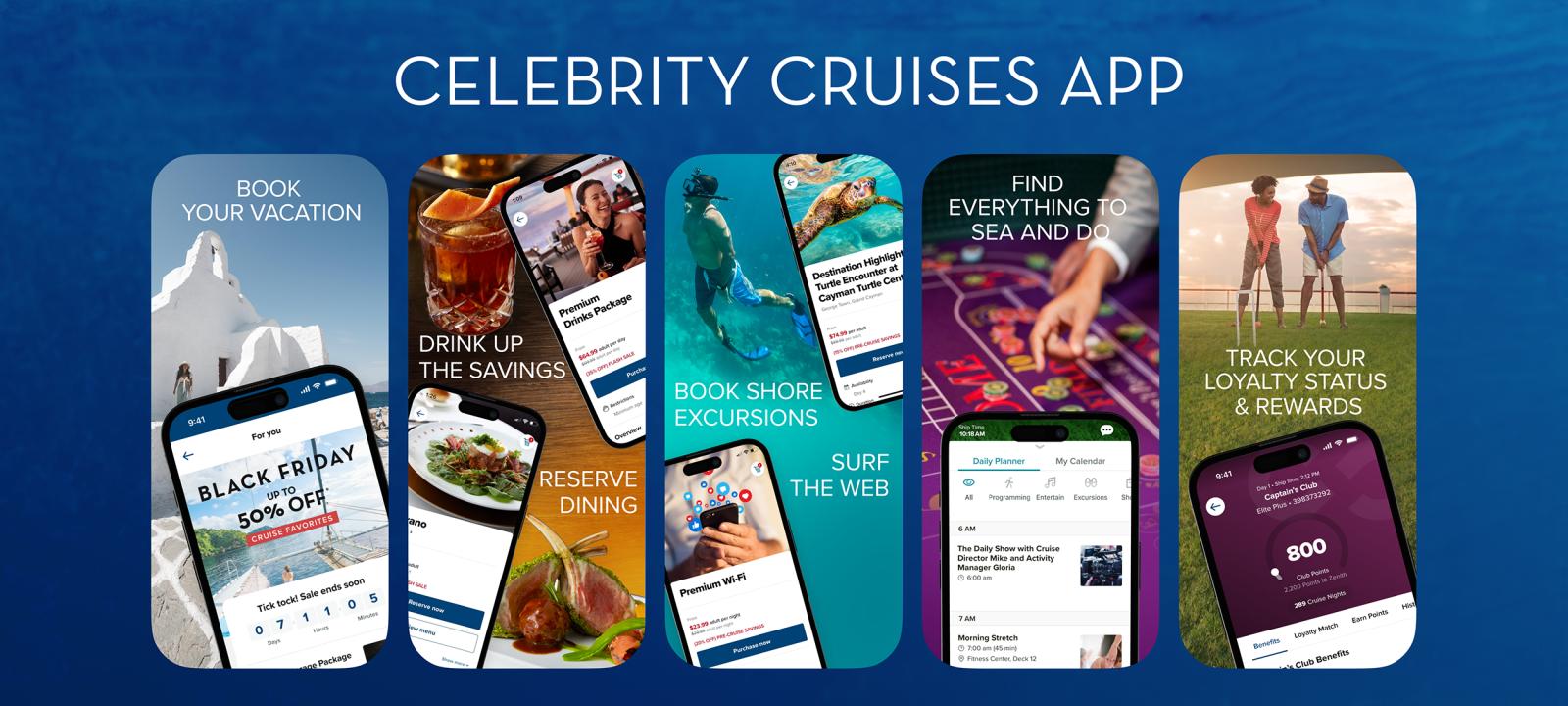
Celebrity's mobile app is one of the more polished cruise-line apps out there, and it genuinely saves time both before your cruise and onboard. These are the tips we share most often with clients — the features worth knowing about, the ones that trip people up, and the quirks Celebrity doesn't always make obvious.
Download the app before you fly
Search "Celebrity Cruises" in the Apple App Store or Google Play. It's free. Avoid downloading at the port — cellular is slow, and app stores sometimes hiccup on public WiFi.
Apple App Store
iOS 14 or newer. Works on iPhone and iPad.
Google Play
Android 8.0 or newer. Most modern phones work fine.
What you can do before the cruise
Check in (Express Pass)
Online check-in opens roughly 45 days before sail. The app version is faster than the website — it uses your phone camera for passport photos and security selfies.
When you finish, the app generates an Express Pass (a boarding QR code). Save it to your phone's wallet.
Book everything
Shore excursions, specialty dining, spa treatments, and onboard experiences. Booking in the app ahead of time locks in better slots and often pre-cruise pricing.
Dining reservations
Browse restaurant menus before you sail. Book specialty dining (Luminae, Murano, Tuscan, Le Petit Chef, Eden) and set times for main dining room.
Pre-order drink packages
Beverage and WiFi packages are usually cheaper bought pre-cruise than onboard. The app shows current pre-cruise pricing and confirms your package to your room.
What to do onboard
Once you're aboard, the app connects to the ship's WiFi automatically — you don't need a paid internet package for most app features. This surprises a lot of guests.
Open the app. It should connect to the ship network on its own. If not, manually connect to the ship WiFi (usually "Celebrity-Guest") and open the app — no login or charge required for app use.
The home screen shows today's schedule — activities, shows, dining hours, pool deck events.
Tap "Daily" to see the full hourly schedule. Tap any event to add it to your personal plan.
Tap "Stateroom Account" to see your running onboard charges, including tips if you prepaid gratuities.
Tap "Chat" to message anyone else in your travel party — free, no cell signal needed. Great for finding each other on a 16-deck ship.
Tips we share most often
Turn on notifications
When the app prompts you to allow notifications, say yes. You'll get reminders about your dining reservations, show times, and embarkation day announcements.
Add shows to your plan
Theater performances can book up. Reserve them in the app as soon as you're aboard — tap a show, tap "Add to Plan," and you'll get a reminder 15 minutes before.
Check your folio daily
Your Stateroom Account updates in near-real-time. Spot a wrong charge? Guest Relations fixes it faster on day 2 than on disembarkation morning when the line is 30 deep.
Use the menu browser
The app shows every restaurant's current menu. Perfect for deciding between the main dining room and a specialty venue before you head down.
Disembarkation day
The app is especially useful on disembark day when there are a lot of moving pieces.
Your disembarkation group assignment and time appear under "Disembarkation".
Tags for your luggage are printed and delivered to your stateroom, but the app reminds you when to put them out (usually the night before).
Express Walk-Off option: carry your own luggage and skip the assigned group. The app shows when that window opens.
Final folio (itemized bill) is visible in "Stateroom Account" — Celebrity also emails a copy 24–48 hours after you leave the ship.
Common questions
Do I need a WiFi package to use the app onboard?
No. The Celebrity app itself works free over the ship's WiFi — you just need to connect to the ship network. A paid internet package is only required for non-Celebrity apps (email, social media, streaming).
Can I use the chat to message people in other staterooms?
Yes, as long as they're also in your travel party (linked to your booking) and have the app open. You can invite party members via their email or reservation number.
What if I have two phones and two reservations?
Each person logs in with their own Captain's Club credentials. The app handles multiple bookings under one account too — useful if you and a partner are in the same stateroom.
My app keeps showing yesterday's schedule — what's wrong?
Pull down on the home screen to refresh. If that doesn't work, quit and reopen the app. Onboard, the app sometimes caches the prior day's Daily if you didn't launch it overnight.
Can I pay my folio through the app?
You can view your folio and the final balance. Actual payment happens automatically on disembark day via the credit card you registered at check-in. For questions about charges, visit Guest Relations in person.
Is there a version for the iPad / tablet?
Yes — the app scales to tablets. Onboard WiFi works the same way. Some guests prefer the tablet for browsing deck plans and daily schedules.
If something goes wrong
Pre-cruise issues
Pride Travelers: 1-888-865-4525
Celebrity: 1-888-751-7804 (24/7)
Or reply to your booking confirmation — we'll sort it out.
Onboard issues
Guest Relations on deck 4 (ship-dependent). App has a one-tap "Contact Guest Relations" button under Help.
Related guides
Limited Time: Get a Free $125 Specialty Dining Credit on Your Next Celebrity Cruise
Book your dream Celebrity Cruises vacation by July 31, 2026, to receive an exclusive $125 specialty dining credit. Sail through April 2027 with this special offer.
Celebrity Cruises Packing Rules: What's Allowed and What's Banned
Celebrity Cruises' bring-aboard rules: the one-bottle wine allowance, $35 corkage in dining venues, surge-protector ban, $250 vape penalty, and what to expect at the embarkation scanner.

Club Royale and Blue Chip Travel Agent Consent
Would you like Pride Travelers to provide assistance with booking your Club Royale and Blue Chip casino offers?